
A Dorico 6 Review
Hello everyone and welcome back to the blog. If you are a music engraver, an arranger, a composer, or someone working with music notation, these last couple of weeks have been incredibly exciting. After what looked like an eternity1, Steinberg has, on April 30th, 2025, finally released the new, latest, shiny update to its next-generation music notation software: Dorico 6.
Compared to its predecessor, which focused mainly on playback improvements, Dorico 6 focuses on notational upgrades, engraving quality-of-life refinements, and a very long list of most appreciated fixes. As a full-time music engraver and indie publisher, you can imagine how thrilled I am but these new features.
In this first article, I will give an eagle’s eye view of all the new features Dorico 6 has to offer to let you familiarise with what has been introduced. Each new feature, then, will get its dedicated article in the coming weeks, both in English and in Italian language. Let’s get started.
Proofreading
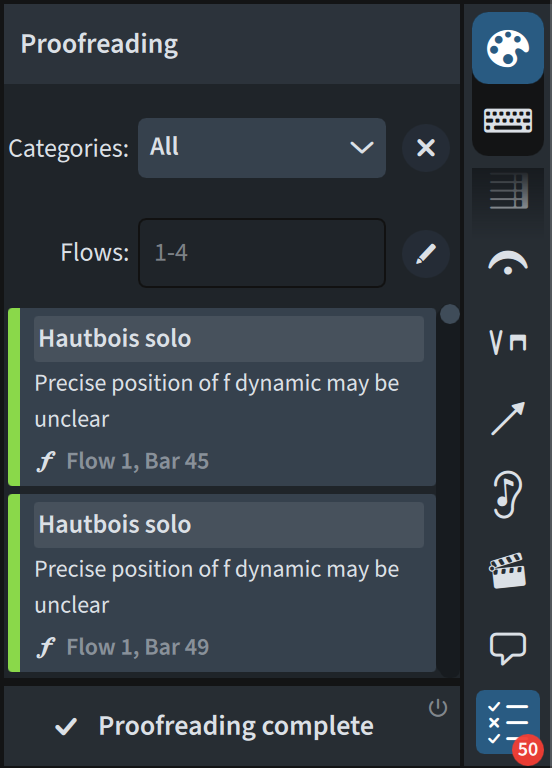
How many times have you had to check your score for missing or misplaced Playing Techniques (e.g., a “pizz.”, or a brass mute)? You certainly still have to do that but, from today, you have a helping hand from Dorico. The new, fresh Proofreading feature you now have, quoting the Version History:
An entirely new framework that allows Dorico to check your project for dozens of potential issues and report them to you.
This will be shown in the dedicated Proofreading panel in Write mode. Currently, covered categories include: metrical problems, superfluous or repeated markings, problems with instrument changes, playability issues with string instruments (yes!). Here’s a sneak peek of how the panel looks:
Cutaways
This is, honestly, a major breakthrough in the history of music notation software: gone are the days when you had to use instrument changes to mask parts of the score in a sadly, truly unreliable way when it came to horizontal spacing and staff label flexibility. With Dorico 6, now, you can reproduce scores in the style of Lutoslawski’s Jeux Vénetiens (1961), or any Ligeti, Berio, Penderecki, Xenakis, and more. This is how Dorico realises the opening bars of Stravinsky’s Requiem Canticles from 1966:

This is all done—if not automatically—painlessly for you. Just select the start and end point, right-click to show the contextual menu, and select Create Manual Cutaway. There are also automatic options, and start- / end-only options, which we will look at in the Cutaway dedicated episode.
Coordination lines
Somehow connected to the previous feature are Coordination lines, also known as synchronisation/time alignment lines, which are used to connect musical events occurring in different instrumental parts. They can connect barlines, or notes, or time signatures, or any other event between two different players. Here’s a quick example from the Version History to show you what they are about:

Notice how, in this example, they all connect barlines. We will delve deeper into a separate episode to show how they can be connected to notes as well. An important detail: they can only be created (and managed) in Engrave mode.
Improvement to chord symbols
While this is something that, in my daily work, I do not encounter much, I can see the importance of being able to show alternate harmonies on specific notes. This is now possible with the introduction of Multiple lines of chord symbols. They work like Lyrics, where we used to change the line with the keyboard’s up/down arrows. Like with Lyrics, it is therefore now possible to change the Chord symbol line, to manage the distance between them, and so much more.
It is now also possible to extend the duration of chord symbols with the same shortcuts used throughout the program: Shift-Option/Alt-←/→.
Chord symbols’ appearance can now be edited, as they get a dedicated page in Engraving Options. The documentation dedicates several pages to this aspect only, and I will take great care to go through these options in a dedicated article. Finally, if one is unsatisfiable, we can now create Custom chord symbols. Before I forget, you can also edit “kerning pairs”, that is, the space between individual components of each chord. In one word: flexibility!
Condensing
While this is not a new feature, a fundamental improvement has been brought to the table: players holding multiple instruments can now condense! Up to Dorico 5, only the first instrument held by the first player in the condensing group would condense, and only with matching instruments from the other players of the group. Now, they all participate in condensing!
Cycle playback
This new feature allows the looping of a section within a single flow during playback. You can drag the triangle handles of the locators, set them from a selection, set only start- or end-point, or clear them. When this feature is active, the locators will turn from grey to purple:
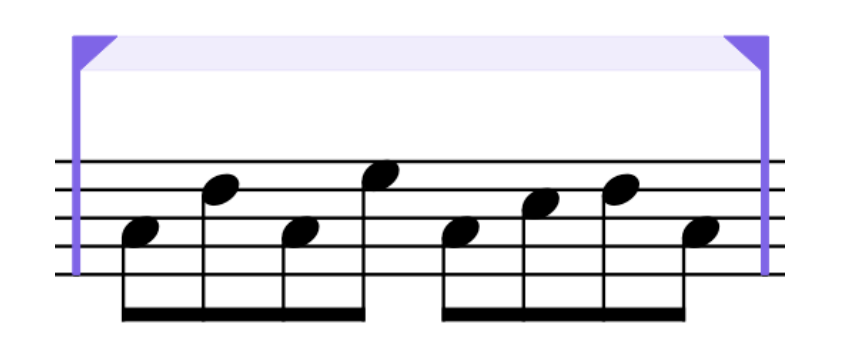
The massive thing is that you can edit the music in that section during playback and ear the changes in the following pass!
Fill view
Joining the two existing views—page view and galley view—, Fill view shows the music in multiple systems sized to the width of the music area, allowing you to scroll vertically to proceed through the flows. It greatly enhances the composing process for small to medium ensembles where all instruments can fit on a single screen.
System-attached items & Time Signatures
The Layout Options dialog now contains a new section that allows you to determine where system-attached items such as tempos and rehearsal marks should appear on the score. Improvements have been made also to the placement of large time signatures, which now can be placed independently on each group of instruments.
Rulers and grid
A most-welcome addition for engravers working with very demanding editors and publishers, rulers allows precise positioning of items on a page exactly how it is possible in DTP software like InDesign or Affinity Publisher.
Thanks to the new grid feature, then, I can retire the third-party software I used to space notes evenly in certain contemporary music pieces. Dorico 6’s grid offers plenty of options derived from existing publishing standards and is fully customisable.

OpenType features & more font updates!
The deeper we delve into these new features, the nerdier the options become! It is finally possible to enable or disable specific glyph positioning and glyph substitution features in OpenType fonts for paragraph, character, and font styles. This is simply spectacular, and opens a plethora of possibilities for high-level publishers and their engraving teams.
The dialogs for paragraph, font, and character styles have been greatly expanded, bringing impressive flexibility to each style:
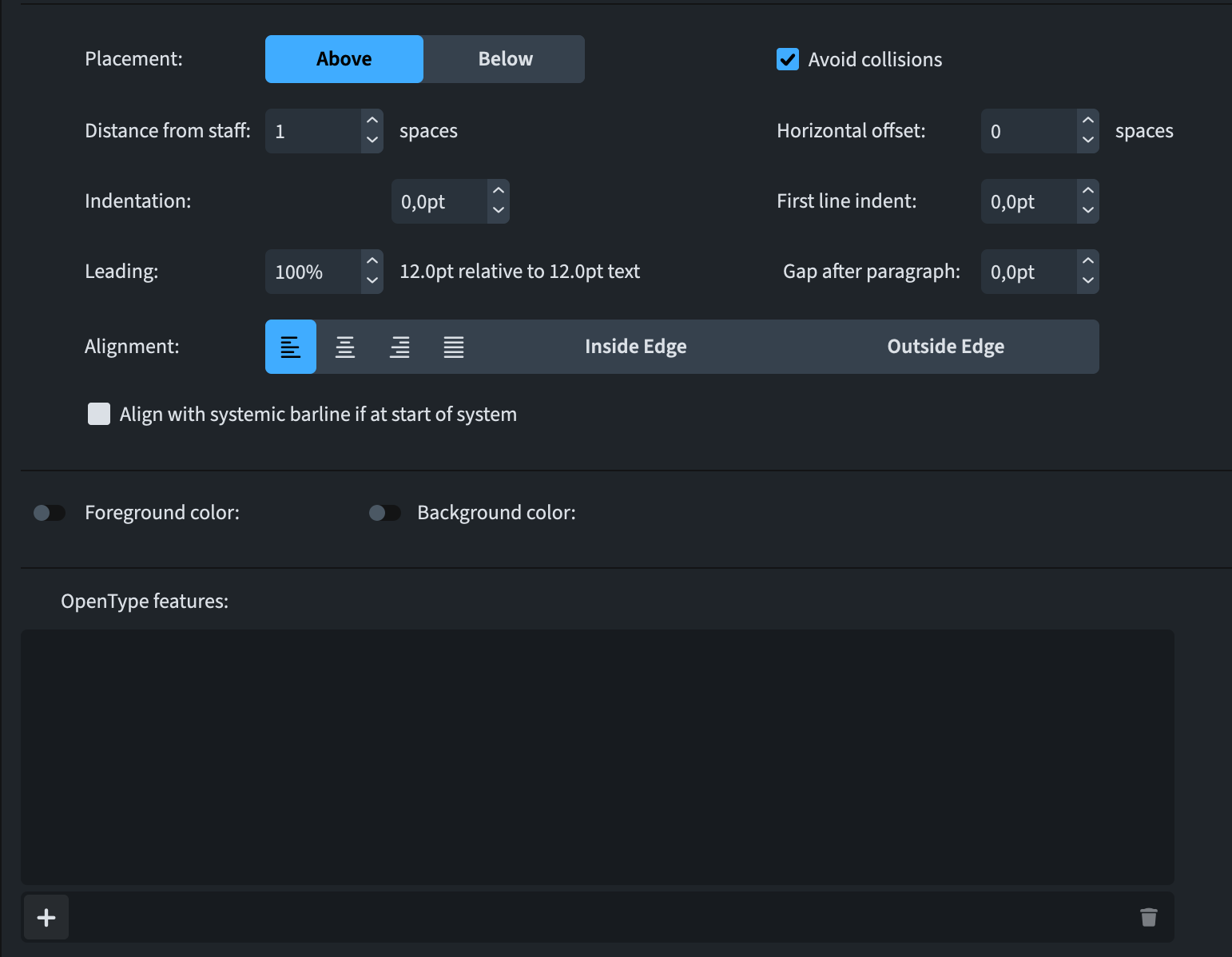
A new text font, Splentino, created by Ben Byram-Wigfield, is now available in Dorico 6. It is a new digital recreation of the Plantin typeface (not-so-old Sibelius users rejoice!).
Flow heading overrides
For users who create projects with tens if not hundreds of flows daily, for example for the educational market, it is now possible to create flow heading override from Setup mode, offering unparalleled flexibility. Gone are the days of page overrides plaguing our Pages panel! Here’s an example from one of my upcoming editions:
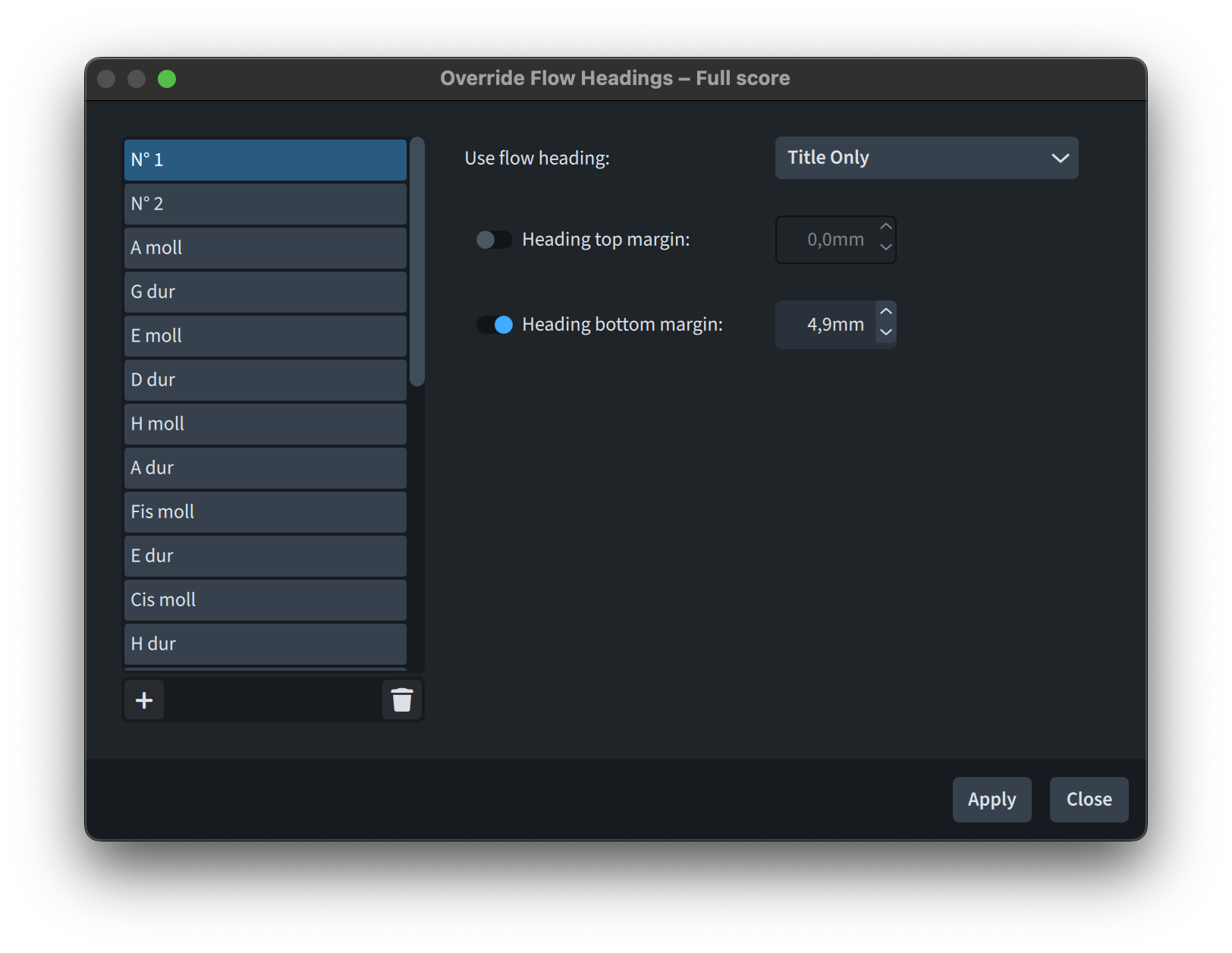
These are layout-specific, so they will not influence your other layouts directly.
There is more!
We are five minutes in, and we got to just half of the Version History document. This release is already packed with features, but here is what more is on the plate in a quick summary before dedicated articles illustrate all of it:
- Importing and exporting user settings, making it safe and quick to set up a new machine.
- View Options dialog, letting you set up and save as default (yes!) all (or some) of your view options.
- Jump bar improvements, allowing access to options throughout the program.
- Marching Percussion Basics, with new sounds and playback templates.
After this, there are twenty-five pages of improvements to existing features, and five additional pages of resolved issues.
Closing thoughts
This article was written with the idea of stirring your curiosity about this outstanding release. Future articles will take care of each of the features listed above. If you are interested in specific closer examinations, please let me know down in the comments or by getting in touch via this website contact form.
Thank you for reading thus far.
See you here next week for the first deep-dive article.
- Dorico 5 was released on May 24, 2023. ↩
 Music Preparation Services