
Episode 9 – Front Matter(s)
We are approaching the end of this series. Now that you have written your opera’s music (notes, lyrics, etc…), cast the music off, laid out pages, accurately proofread it (you did this, right?), you are ready for the last step: building the final book.
In ordinary orchestral music, not much is needed apart from an (optional) brief introduction by the composer or dedicatee and the orchestral forces involved and their positioning (if unconventional). In an opera, instead, quite a few extra pages are needed in the front matter. What follows is a general list with a personal description of what each page should contain; please prioritise your publisher’s instructions over mines.
Cover Page (p. 1 & 3)
The cover page, which comes in two copies, on the first and second recto page—the external one usually printed on thicker cardboard paper, the internal one possibly containing a few extra info.
From the top, we should have the Composer’s name and surname, then the opera’s Title. If it is not in English, state it in its original language and, below it, in a smaller, optionally Italic typeface, repeat it in English. Just below that, as a Subtitle, write “Opera in X Acts (Y Scenes)”, where X is the number of acts and Y is the number of scenes. Verdi sometimes writes: “Atti” and “Quadri”, but this last one is something different from scenes, rather some sort of interlude between the acts. You will know what your opera needs.
If applicable, below that, write the Opus number of your opera. Just under that, only in the inner cover, write “Libretto by <librettist>”. Below that, if the libretto was in a certain language, and your opera includes a translation to another language, write “<language> translation by <translator>”.
Finally, at the bottom of the page, state whether this is a FULL SCORE or VOCAL SCORE.
While I am personally creating all these pages in Adobe InDesign, you can go ahead and create them as blank pages in Sibelius. It is less flexible, but it can work. Regardless, all these fields can be pre-populated in Sibelius from its File > Info page in the Ribbon and called in the score via wildcards. Start here:
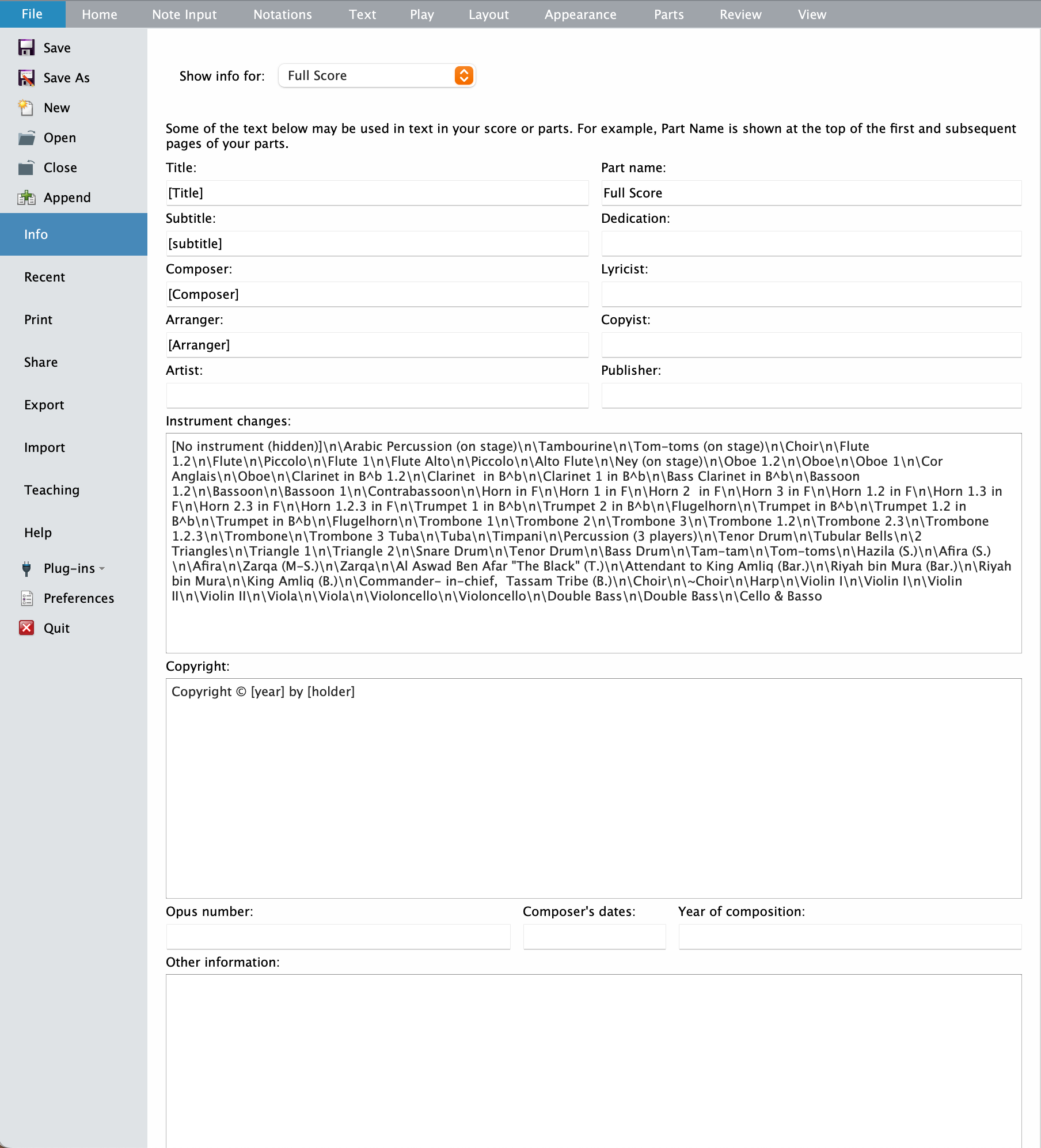
Write the appropriate details in each field then, in the score, call them via wildcards1, which are in the following format:
\$<fieldName>\
Copyright Page (p. 4 or 5)
The copyright page can either go on page 4 (verso of sheet 2) or on page 5 (recto of sheet 3). Layout may vary, but here is an example:
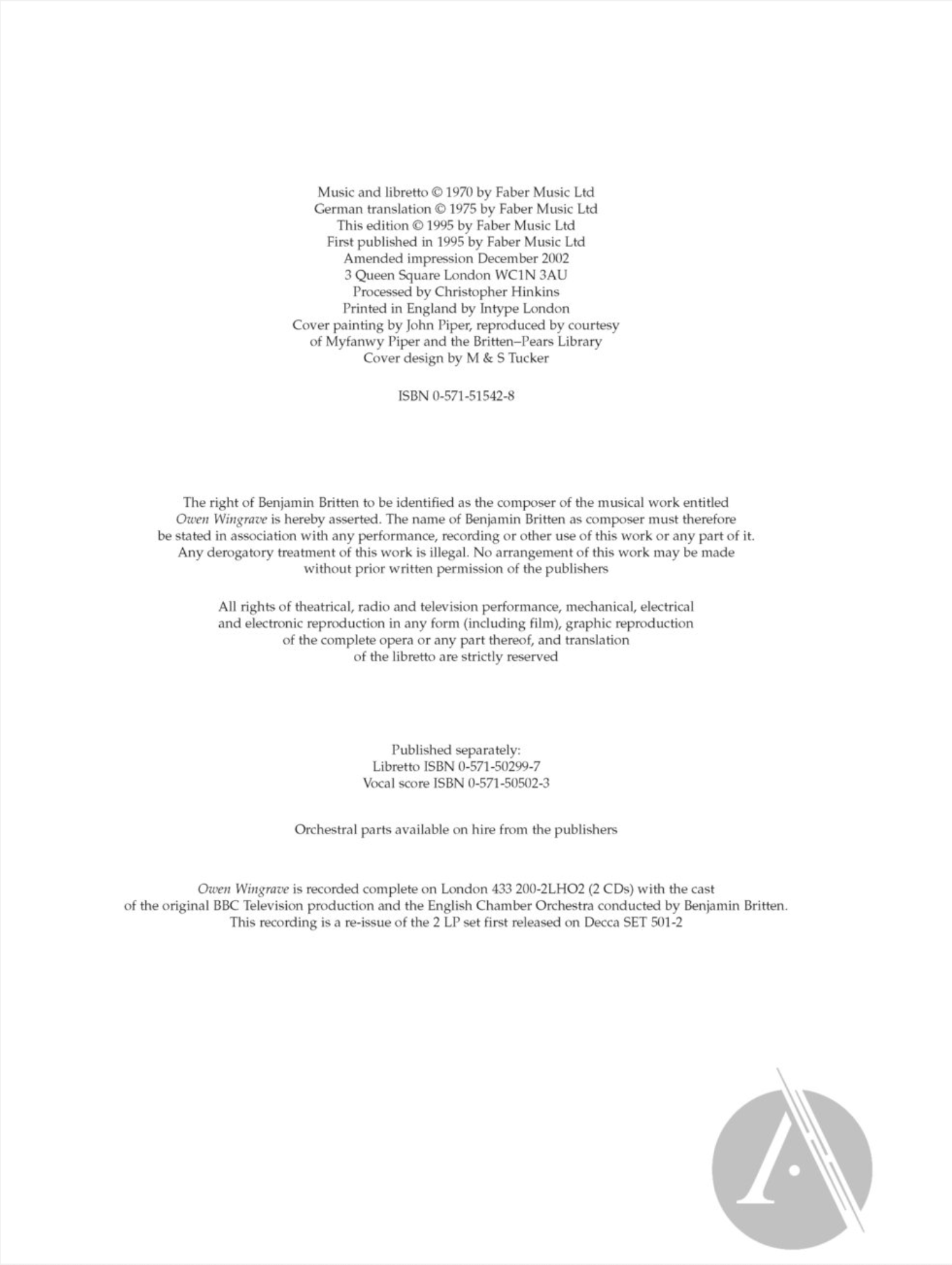
In most cases, your opera will have less info than this mighty one, and it may be enough to just write those in the bottom left or bottom-right corner of the page. Here are the fields that should appear:
- Music and libretto © <year> by <copyright-holder>
- Translation © ibidem
- This edition © ibidem
- First published in <year>
- Amended impression: this is optional if your score was published and printed in a specific year (the “first published in” one) and now you got to correct, update, and print it again.
- Address: this is reserved for operas with a big team behind them. Same thing for the “Processed by <engraver>” field2.
- Printer: if you’re so lucky to already be at a stage where your score is being printed and distributed, write “Printed in <country> by <company>”.
- If the cover has a dedicated illustration by an artist, you should mention it in the following format: “Cover painting by <artist>, reproduced by courtesy of <copyright-holder>”. The cover designer, if present, may also be mentioned with “Cover design by <artist>”.
- If your score is being published, you should have gotten an ISBN (International Standard Book Number) from your publisher. Add it in a new line. Every version should have its separate code (score, vocal score, libretto, set of parts, …)
In the image above, you can check the part that begins with “Right of <composer> to be identified…”. Check with your publisher if this needs to be added and where, as it may be legally important.
“Orchestral parts available on hire from the publishers” is a standard practice all over the world. Possible recording details may be added if you already have those agreements in place.
Dramatis Personae page (p. 6)
This page lists characters, usually in order of appearance. The character’s name should be in ALL CAPS, followed by a comma, and by their role in the opera. His/her vocal register should be written in Italic. A brief description of the scene where the opera takes place may be placed here under the character’s list. The title of the page should either be “Dramatic Personae” or “Characters”, in ALL CAPS.
The position of this page in the front matter varies from publisher to publisher; in Owen Wingrave, for example, it comes right before the Instrumentation page.
Table of Contents (p. 7)
A Table of Contents (also titled Contents or Scenes) will be crucial for navigating your file. You should get two different Paragraph Styles for this: one for “ACT number”, with no page number shown and either flush left or centred, and one for “Scene number”, with an optional title and showing the page number.
Duration, either global or for each act, may be shown here, centred on the page, if not already shown with the Instrumentation.
Commission page (pp. 8 and 9)
Assuming this opera was commissioned by some entity, this should be stated on its page as follows:
<Opera-title> was commissioned by
<commissioner>
and was first shown <TV/radio-emittent> on <date>
A list of roles and names of the actors/singers who performed at the premiere should be included here. An extra page may be added to list all involved people in the production of the premiere (costumes, scene designers, etc…)
Instrumentation Page (p. 10)
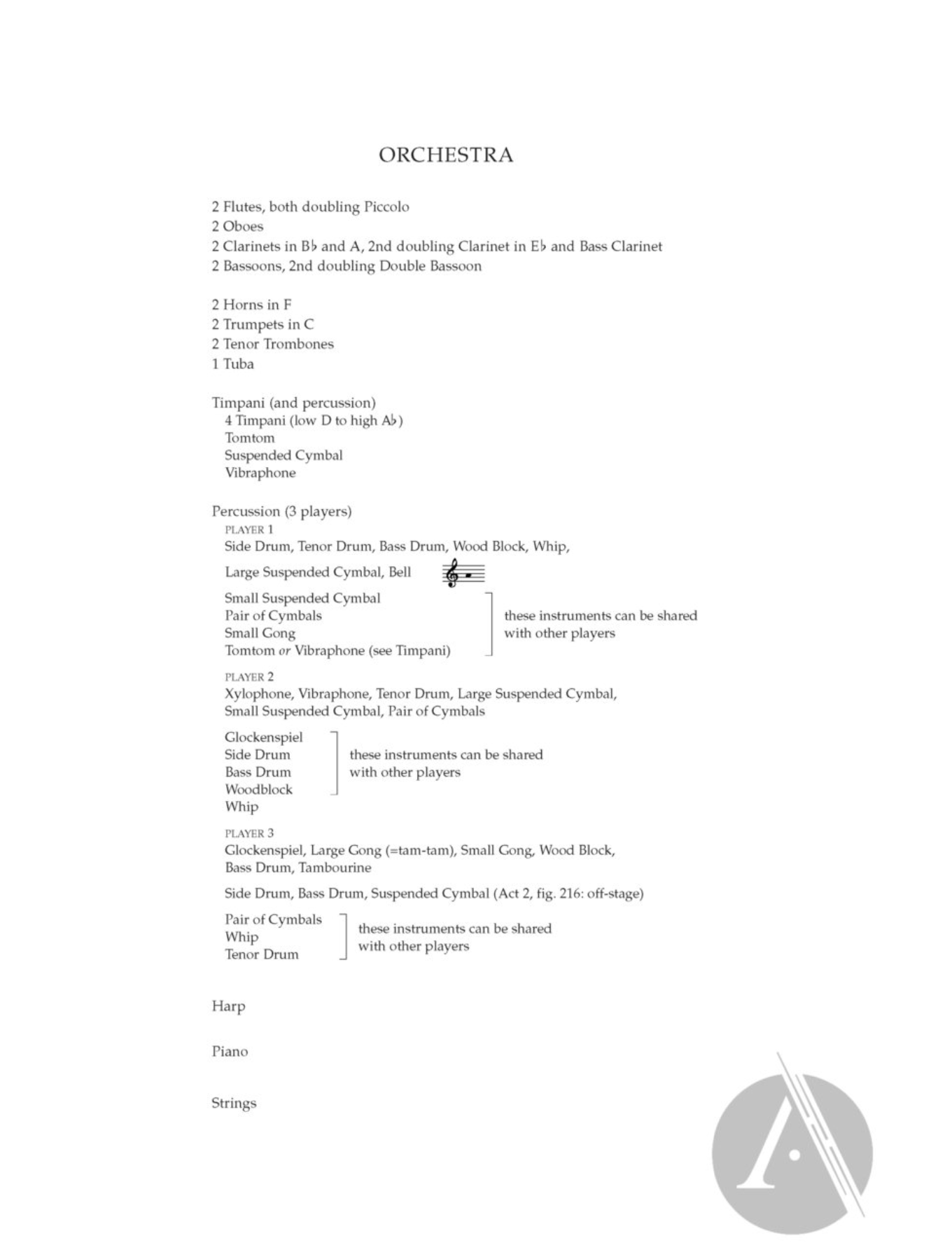
This page, usually on the verso side if it immediately precedes the beginning of the music, contains all the instrumentation info to help conductor and librarians. Here’s an example from Britten:
And one from Šostakovič:
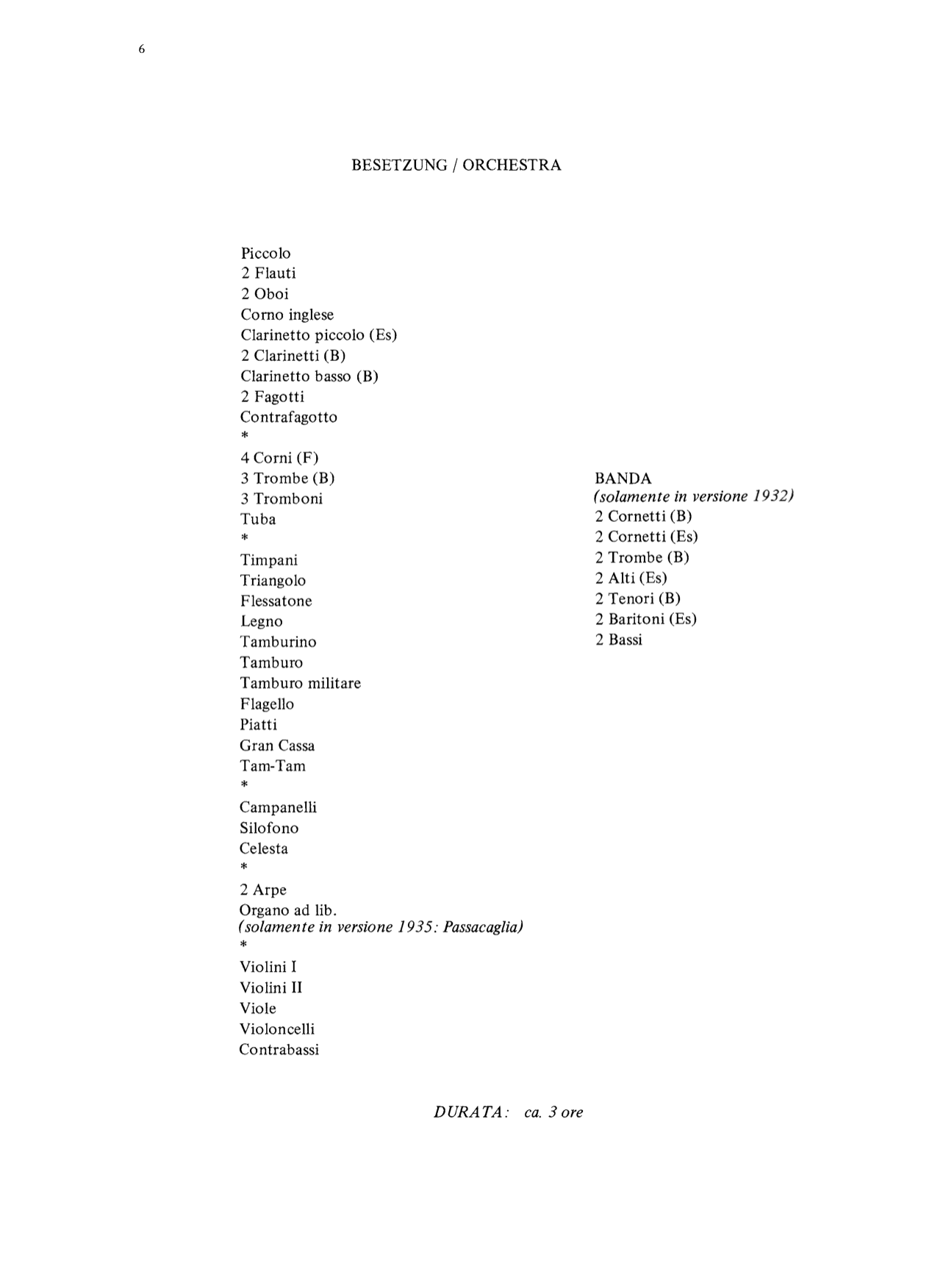
The placement of the front matters varies between composers: Britten places it at the end, Šostakovič somewhere in the middle. Try to avoid “Flute 1”, newline, “Flute 2”, and rather have “2 Flutes, both doubling Piccolo”. Percussion should be grouped by musician, indenting the single instruments. Duration can be added here or in the Table of Content.
Prefatory Note page (pp. 11 & 12)
This page contains every detail you may want to include regarding the history of the opera itself. It is known by several names: “Notes on the History of the Opera”, “Prefatory Note”, etc… It is to be found either before or after the instrumentation page, in any case before the first music page. An “Editorial Page” may follow if more information is necessary.
MUSIC
The musical part will, therefore, finally begin not before page 13 of the document. You may want to use Roman page numbers for the front matter.
Bottom Line
That’s it for today! This was a long one and, if you managed to stick with me up to this point, you have all my gratitude! In the next episode, we will look at how to build this book in either Sibelius or InDesign, giving you the best of both worlds. Thereafter, we will explore the differences between the Full Score and the Vocal Score. Stay tuned!
If you enjoy what I do, please consider liking this article, sharing it with your friends, and subscribing to this blog to be notified of upcoming articles. If you use an iPad and would like to improve your Sibelius experience, please give a look at my profile for MetaGrid Pro here.
I also have a newsletter that follows my publishing journey, check it out if you are interested in cello (and more) and would like to receive exclusive gifts. You can also browse my online catalogue here.
Thank you for your time and continuous support.
See you in the next episode!
Michele
- Check the User Guide (found via Help > Sibelius Reference) at page 524, section 5.16 Wildcards, for more info on how to use wildcards. They are powerful and flexible. ↩
- I wish all the works I engrave stated my name somewhere, but it happens only for very specific composers with whom I have a years-long relationship and that have proposed themselves to share their limelight with me (and for which I am deeply grateful). ↩
 Music Preparation Services
3 thoughts on “How to engrave an Opera (in Sibelius) – Ep. 9”