
A review of Dorico 6’s additional improvements
This article constitutes the third and last part to our extended review of all additional improvements introduced by Dorico 6. You can find the previous articles here and here.
PART 3 — Miscellaneous improvements
Audio engine
When quitting Dorico, the program now waits up to 10 seconds for the audio engine to exit completely before being terminated. This should prevent the annoying occurrence of having no sound if Dorico was relaunched too soon.
Clefs
To combat the issue of explicit clef changes at the beginning of a flow being present following an XML import, a new Delete Initial Clefs command has been added. Be careful that this will delete explicit clef changes from the beginning of every flow. It can be triggered from the jump bar or from a key command.
Guitar tablature
It is now possible to move notes from one string to another by selecting it in the tablature and pressing the N or M keys, similarly to what done for the hands of the piano. Since moving the selection from the notation staff to the tablature was not possible without the mouse, two new commands have been added to perform this with the keyboard: Move to String Above/Below.
Harmonics
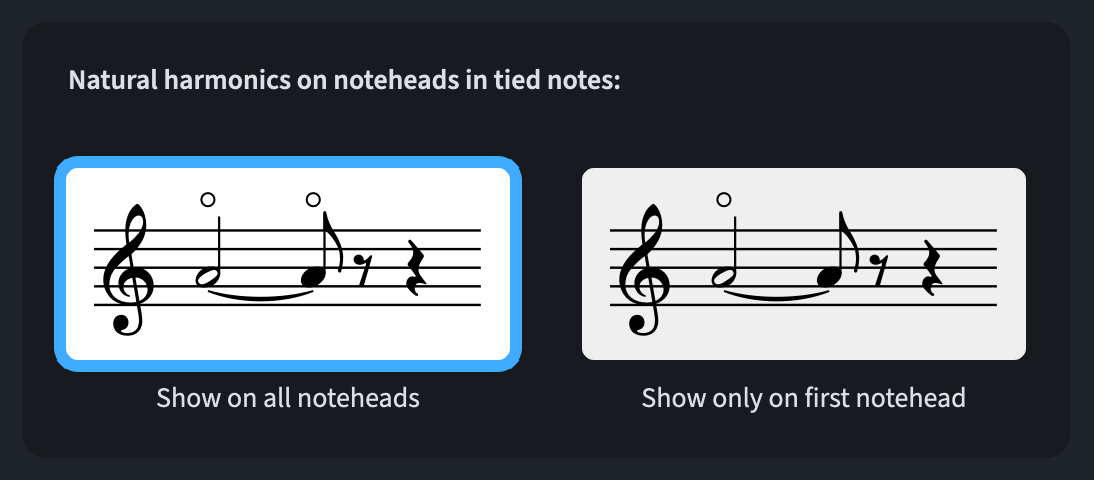
Finally, the greatest addition ever for me, it is now possible to show natural harmonic circles on every note in a tied chain. To activate it, go to Engraving Options ▶︎ Harmonics:
Harp pedalling
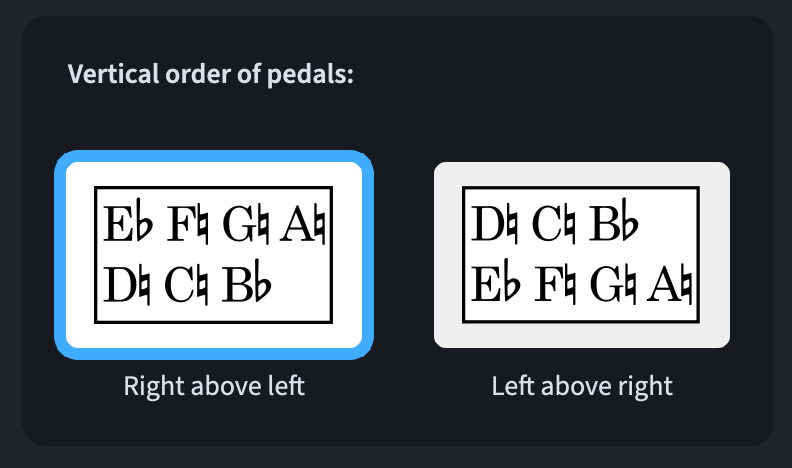
A new option to manage which harp pedals should be shown above has now been added to the Engraving Options ▶︎ Harp Pedals page:
Lines
Improvements to the lines editor have been discussed in detail in this article. The only thing we had not considered there is the possibility to activate the new Avoid collisions property for horizontal lines placed outside the staff.
Markers
The Show in timecode options found in Engraving Options ▶︎ Markers now apply to the timecode shown in markers, as well as to the timecode shown at the start of the system or on the timecode staff.
MIDI Import/Export
Lyrics are now included in both MIDI import and export workflows. It should be specified that there is no universal standard for encoding lyrics in MIDI files, so results may vary.
Music fonts
Academico has been updated to version 0.905, improving kerning for numerals. Petaluma reaches version 1.065, and Petaluma Text version 1.066. These add left- and right-pointing arrows for tempo equations, and revise the width of the space character in Petaluma Text.
Golden Age (1.05), Sebastian (1.21), and Nepomuk (2.52) have also been updated.
MusicXML export
The following improvements have been made to MusicXML export:
- Instruments showing both notation and tablature are now exported as two independent parts.
- Transposing instruments now export their pitches correctly and reliably.
- Basic font information about lyrics are included in the export
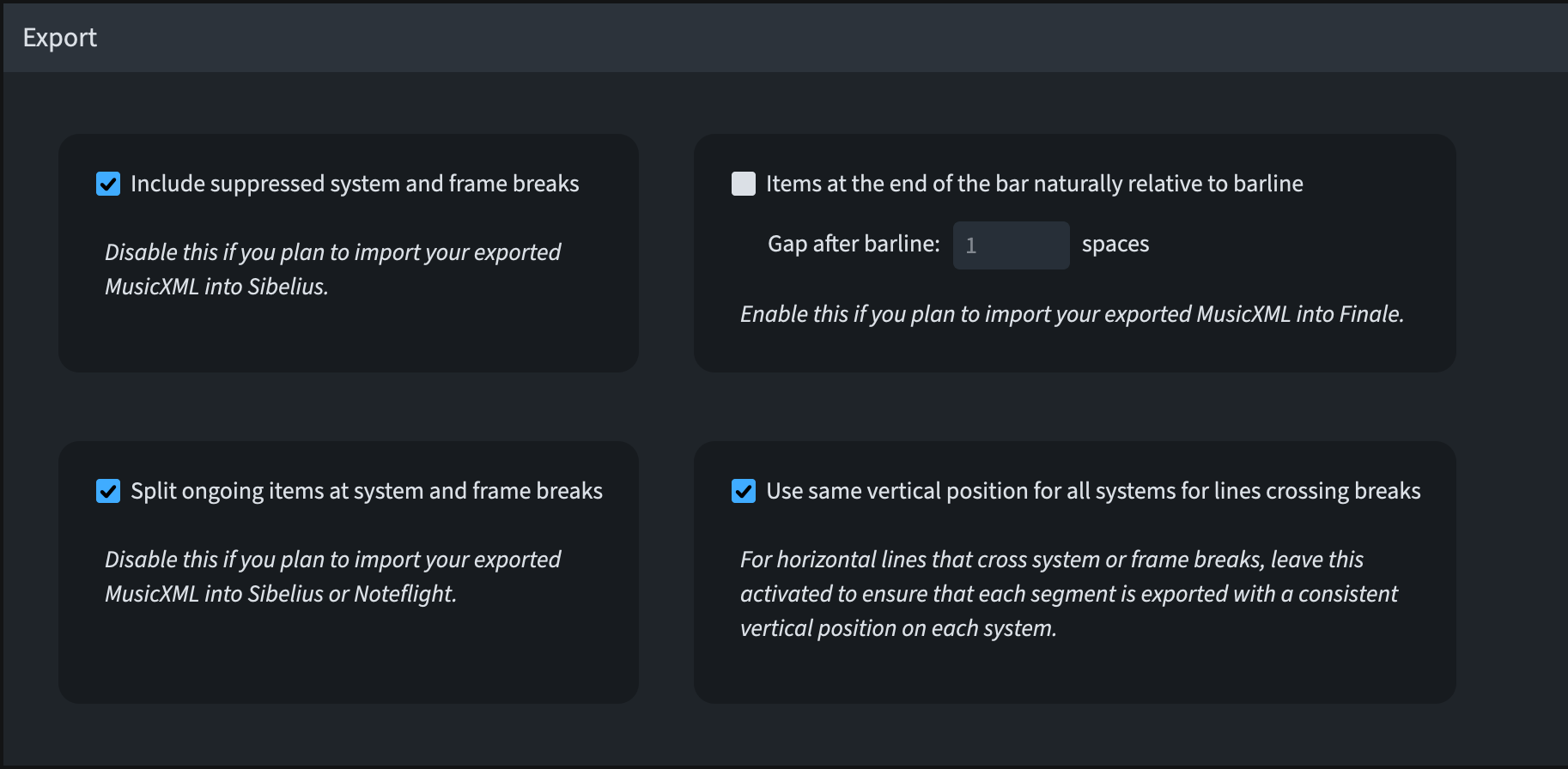
- More information about the position of non-note items with rhythmic durations (e.g., gradual dynamics and octave lines) is now included. This can cause troubles in the receiving application, so you may want to go to Preferences ▶︎ MusicXML ▶︎ Export and:
- Deactivate all three options if you are exporting to Sibelius
- Activate all three options if you are exporting to Finale
- Deactivate Split ongoing items at system and frame breaks for Noteflight.
Numbered bar regions
The way each option takes precedence has been tweaked so that the Appearance of bar count always has priority over the others. In this way, properties specified in the Lower zone always act as overrides, which could misfire in the past.
Project files
When you first save a newly created project, the default suggested file name is now equal to the project title specified in File ▶ Project Info.
Setup mode
In Setup mode, going to Setup ▶︎ Create Default Part Layouts now creates a new part layout for any player who does not have its individual part layout.
User interface
Popover vertical position upgrades are described here. The possibility to edit font settings for selected items is described here. Additionally, in dialogues where Dorico’s rich text editor appears, the standard shortcuts are now all operational, including Option/Alt-X for converting to and from Unicode code-points.
The circular handles in Write mode and square handles in Engrave mode have been refined. They’re proportionally smaller at higher zoom levels. Furthermore, handles become more translucent and drawn with thinner lines at higher zoom levels. Likewise, the faint bar numbers shown when View ▶︎ Bar Numbers is active are now proportionally smaller at higher zoom levels, therefore obscuring less music.
Further refinements include:
- An enriched status bar, confirmation to modal dialogues are described here (milliseconds).
- A less intense and prominent appearance of list and grid view controls across the app
- A new What’s New page in the Hub.
- Zoom recent project thumbnails; improved instrument filters are described here (shining).
- A new Auto value has been added to Preferences ▶︎ General in the Theme drop-down menu of the Window section. This allows Dorico to automatically switch between using its dark or light appearance according to the operating system’s settings.
- Going to the Suppressed Messages section of Preferences ▶︎ General, you will find a new Reset Warnings button to allow Dorico to send you warnings for alerts you have asked not to show again.
- User settings are now all saved in the same ‘Dorico 6’ folder in the user-level application data folder on both macOS and Windows. They are:
C:\Users\<NomeUtente>\AppData\Roaming\Steinberg\Dorico 6for Windows and/Users/~<NomeUtente>~/Library/Application Support/Steinberg/Dorico 6for macOS. - The terminology for ’system-objects’ has now been replaced with ‘system-attached items’.
- The Edit ▶︎ Go to bar dialogue now only lists flows connected to the current layout.
- The Missing Fonts dialogue now has clearly resizable columns.
Video
Dorico now supports video resolutions up to 8K, and HDR video files now have improved colour reproduction.
Bottom Line
That’s it for today and for this massive series! Come back soon for the review of what introduced in the next point release: 6.0.10!
If you enjoyed this post, please leave it a like, subscribe to get notified of upcoming articles, and don’t forget to do the same for Anthony’s video and for the Dorico YouTube channel.
Should you be interested in my other activities, please visit my website and consider joining my mailing list, where you will be able to follow my journey through music notation and independent music publishing.
Thank you for your time, and see you here in the next episode.
 Music Preparation Services